School-controlled movement awareness

Operational awareness for school movement, passes, and incident follow-up.

Valkor Systems helps approved administrators review pass activity, movement exceptions, receiver health, and incident follow-up from one calm school-hours dashboard.

No GPSNo CamerasNo BiometricsHuman Reviewed

Decision support only. Approved staff verify facts and decide next steps.

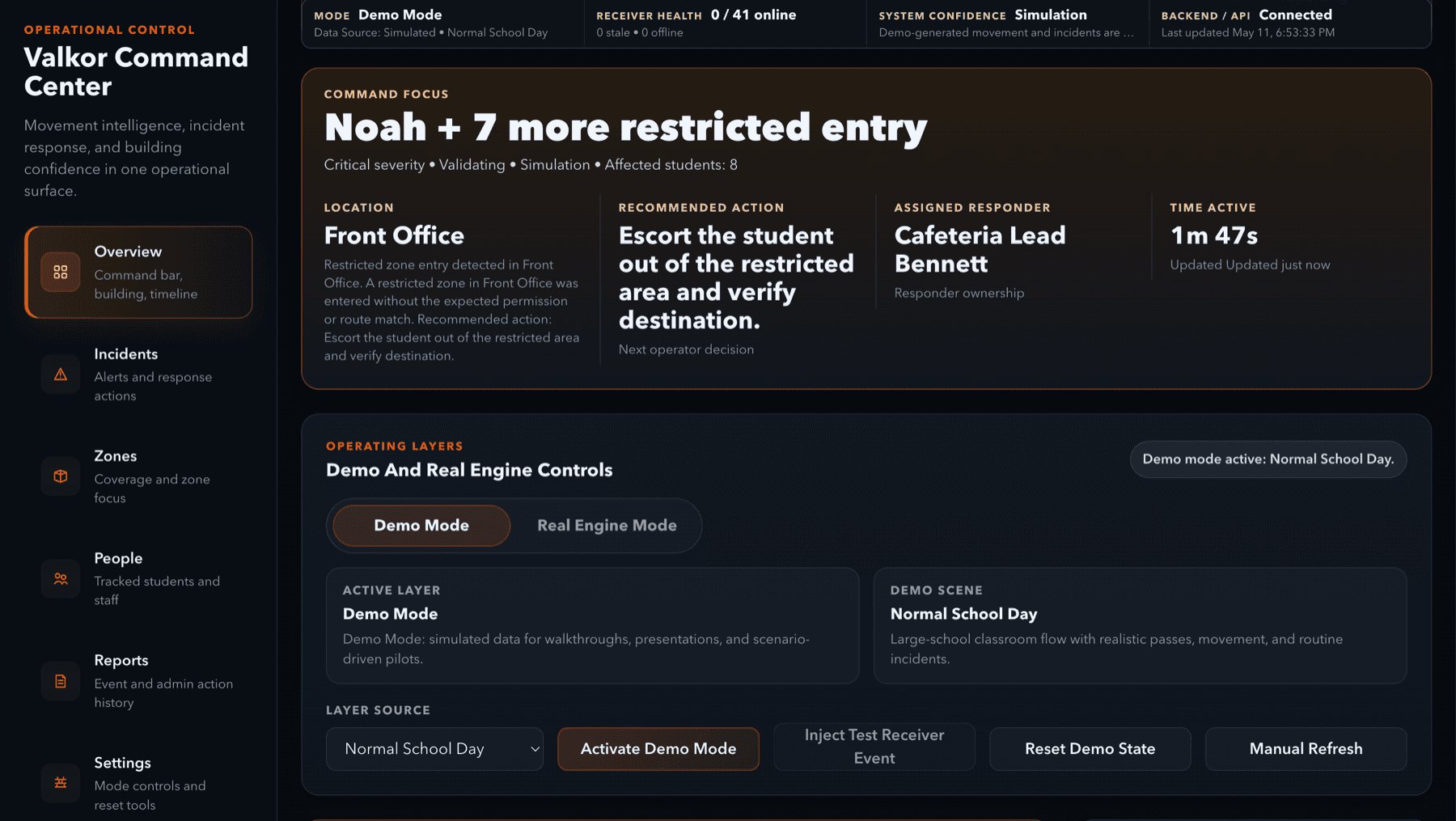
Valkor command center dashboard showing demo mode, receiver health, system confidence, and incident controls.

Approved Zones

Main hallway, office wing

Overdue movement

2 need review

Receiver health

4 online / 1 stale

What Valkor Does

A controlled operating layer for daily school movement.

Valkor gives school teams a structured way to see movement status, system health, and follow-up work during approved hours. Staff remain responsible for decisions.

Pass visibility

Approved movement, overdue trips, and route context stay in one operations view.

Building-area context

School-defined areas are shown with freshness and signal quality, not GPS precision.

Reviewed follow-up

Staff can acknowledge, assign, resolve, dismiss, and review incident records.

Why Now

Schools need operational context, not more disconnected signals.

Administrators are managing more hallway movement, documentation, and follow-up expectations with tools that were not built for live operations.

More movement to manage

Hall passes, transitions, office visits, late arrivals, dismissals, lunch movement, and event-day flow all create live operational questions.

Disconnected tools

Radios, hallway cameras, paper passes, staff memory, and disconnected systems leave gaps between what happened and what administrators can review.

Faster follow-up expectations

Administrators need to understand movement, assign follow-up, and document outcomes without turning every signal into a crisis.

Valkor is built for daily operations: earlier context, clearer handoffs, and careful review without fear-based safety claims.

Product

What schools can evaluate in a controlled pilot.

A pilot focuses on the daily gaps that create operational drag: overdue movement, pass confusion, receiver reliability, and follow-up.

Hallway accountability

See when students are out on approved movement, when they are overdue, and when movement may need follow-up.

Building-area awareness

Focus on defined areas such as hallways, bathrooms, cafeterias, offices, gyms, exits, and restricted spaces - not exact GPS coordinates.

Signal honesty

Show whether a location estimate is confirmed, likely, weak, uncertain, stale, or unknown instead of overstating imperfect data.

Receiver health monitoring

Give administrators and technical reviewers visibility into receiver status, degraded signals, stale data, and system confidence.

Incident workflow

Support detection, validation, acknowledgement, assignment, response, resolution, and dismissal.

Pilot proof reporting

Measure receiver uptime, zone accuracy, false alerts, missed detections, overdue pass detection, response actions, and privacy feedback.

Movement Accountability

  • Students out longer than expected
  • Movement outside approved pass routes
  • Hallway and bathroom accountability
  • Students leaving class without a pass
  • Late arrival or early dismissal movement

Zone & Restricted Area Awareness

  • Restricted-zone visibility
  • Exit-area awareness
  • Repeated gathering zones
  • Bathroom or hallway clustering
  • Office, cafeteria, gym, or locker-room movement

Incident Review

  • Incident acknowledgement and assignment
  • Staff response follow-up
  • External alert context where approved
  • Resolution reasons and action history
  • Weak or stale signals separated from misconduct

Pilot Reporting

  • Receiver/device health
  • Stale or missing signal awareness
  • After-action reporting
  • Pilot trend reports
  • Admin coverage and workflow gaps
Review careful scenario examplesDetails
Operational attendance context: understand whether a student is in class, out on an approved pass, overdue, or appearing in an unexpected zone after attendance has been taken.
Conflict review context: surface convergence, clustering, restricted-zone movement, or repeated route deviations that may warrant staff review.
External alert context: when a vape sensor or external alert is triggered, Valkor can help administrators review who was recently present in the relevant zone, subject to school policy and human review.

Signal Flow

From local signal to review-ready context.

Approved badge signals, receiver health, and pass status are translated into a calm operations view for staff.

Signal Received

01

Approved badge emits local signal

Approved badges broadcast local building signals inside the pilot scope.

Area Detected

02

Receiver detects defined area

Fixed receivers listen in approved areas and report what they hear without GPS precision.

Confidence Checked

03

Confidence engine checks signal state

Freshness, signal quality, receiver overlap, and receiver health are reviewed before context is shown.

Movement Reviewed

04

Movement engine compares pass context

Pass status, expected route, overdue movement, and zone activity are evaluated as operational context.

Admin Review Ready

05

Dashboard surfaces reviewable context

Approved administrators see reviewable context and decide what follow-up is appropriate.

Valkor surfaces context for approved administrators; it does not create automatic discipline decisions or claim GPS precision.

Product Proof

Live software proof, with one clear command center.

The Valkor interface brings movement state, receiver health, incidents, and pilot reporting into one reviewable workspace.

Valkor command center
Command center overview screenshot

Command view

Mode, receiver health, backend status, and command focus.

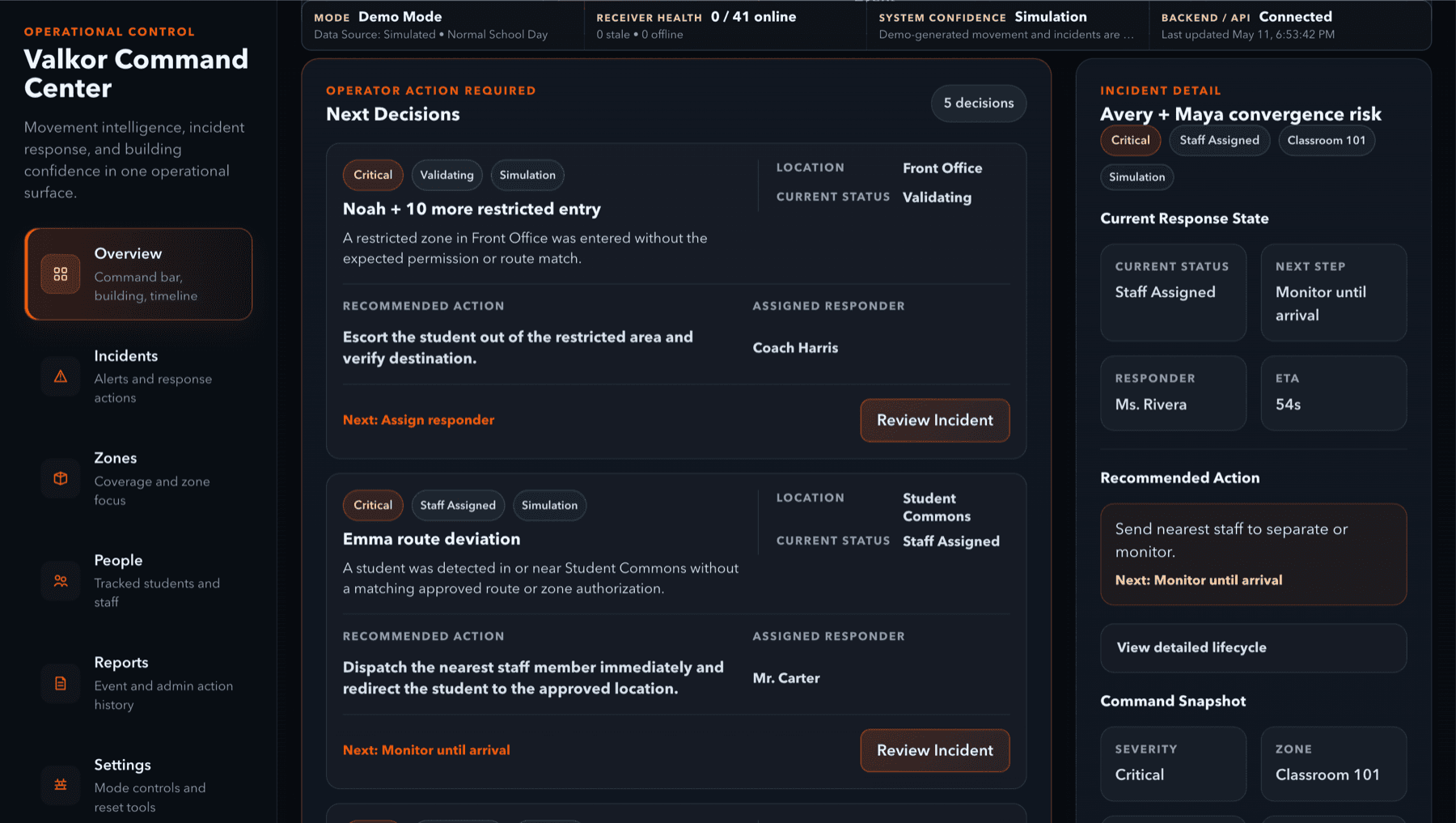
Command View screenshot

Command View

Receiver health, demo/live state, command focus, and operational status in one place.

Movement State screenshot

Movement State

Zone, pass, freshness, and confidence context for approved review.

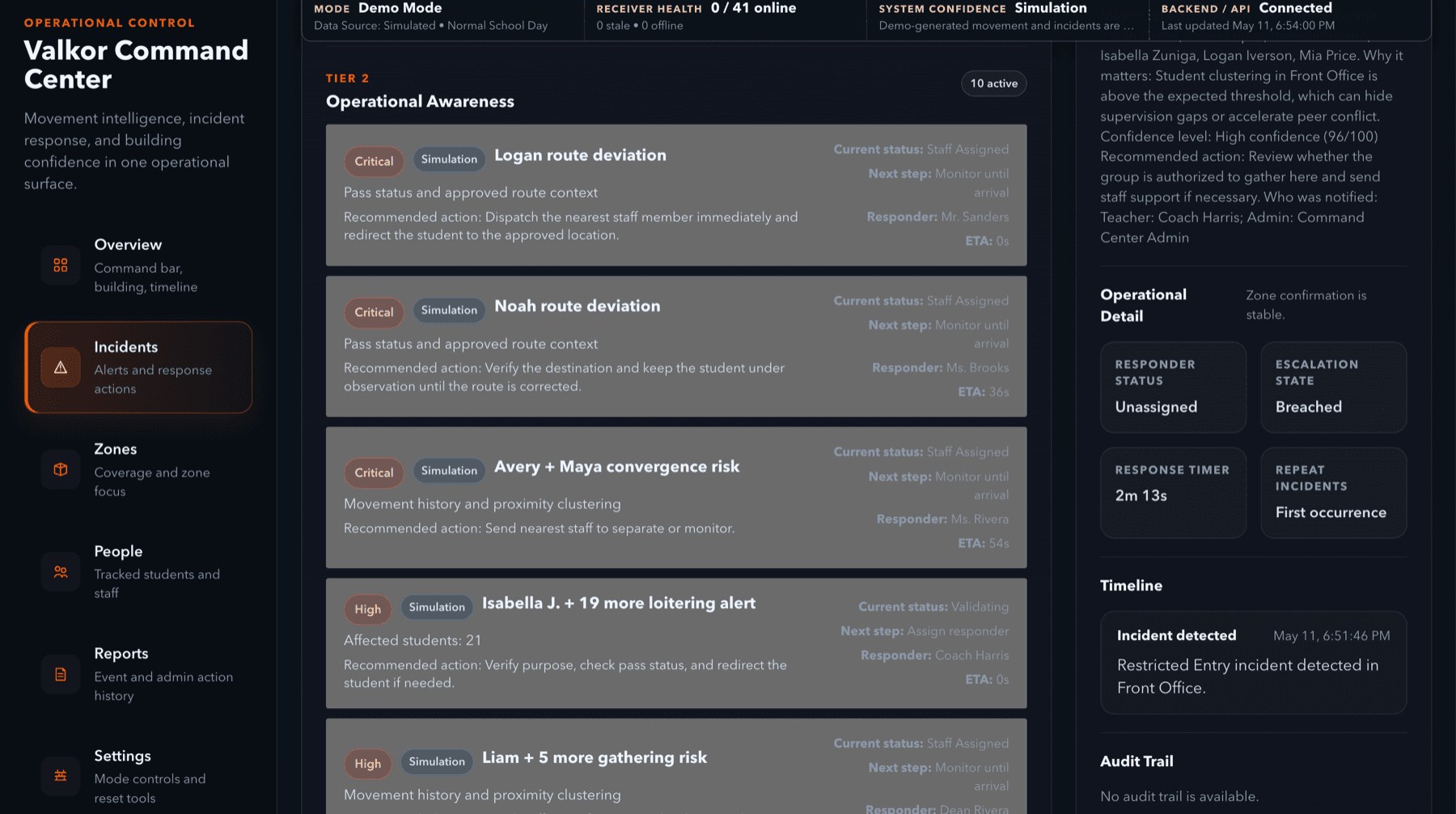
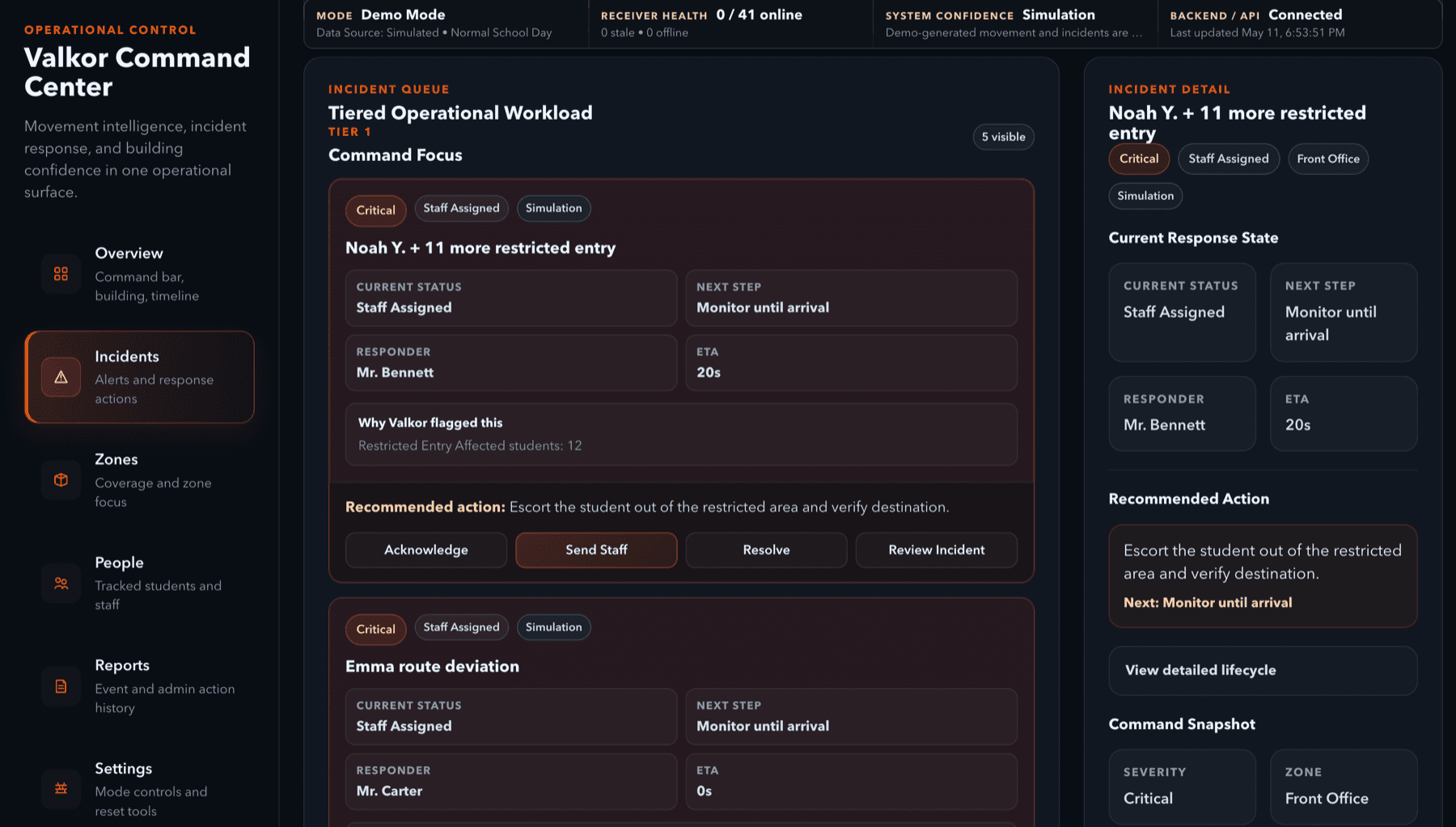
Incident Workflow screenshot

Incident Workflow

Recommended next steps, responder assignment, and human resolution controls.

Pilot Reporting screenshot

Pilot Reporting

Action history and pilot outcomes stay reviewable without expanding scope.

Product proof includes

Command ViewMovement StateIncident WorkflowPilot Reporting

These visuals show freshness, receiver health, incidents, and uncertainty instead of pretending every signal is perfect.

Pilot Program

Controlled pilot structure for school review.

Valkor pilots are limited, measurable, and governed by the school. The goal is to evaluate value and trust before any expansion.

Duration

4-6 weeks

Receivers

3-5

Badges/devices

10-30

Zones

2-4

Use cases

Hall pass movement, overdue trips, route deviation, receiver health, admin follow-up

Limited and measurableReversible pilot scopeSchool-hours-only operationApproved zones onlyApproved users onlyPseudonymous IDs where appropriateNo GPSNo biometrics

What the pilot proves

A Valkor pilot should show whether the dashboard reduces hallway uncertainty, improves pass accountability, validates receiver coverage, and supports calmer incident review.

The first pilot is not full-school automation. It is a focused review in selected areas, with real staff workflows and measurable results.

Usefulness

Do administrators get clearer follow-up context without extra operational burden?

Reliability

Where is receiver coverage strong, stale, weak, or in need of adjustment?

Trust

Can the school explain the data, boundaries, access model, and review process?

Pilot outcomes and measurement examplesDetails

School should understand

How reliable building-area visibility isWhich areas create the most movement confusionHow often students are overdue or off-routeWhether administrators find the dashboard usefulWhich alerts are valuable versus noisyWhere receiver coverage needs improvementHow Valkor fits into existing school workflowsWhether the system is trusted enough for expanded deployment

Measurements

Receiver uptimePacket reliabilityStale-data rateConfidence levelsFalse alertsMissed detectionsOverdue pass visibilityRoute deviation reviewStaff usefulnessPrivacy feedbackTechnical reliability

Valkor earns expansion by proving usefulness, reliability, and trust in a limited deployment first.

Trust & Privacy

Bounded by design, controlled by the school.

Valkor is built around defined operating boundaries, limited access, visible uncertainty, and staff verification.

Hard product boundaries

No GPSNo camerasNo biometricsNo microphonesNo home trackingSchool-controlled accessHuman-reviewed workflows

School-Governed Operations

Schools and districts remain responsible for deployment scope, policy, review, and action.

Area Awareness, Not Exact Tracking

Valkor supports defined areas and confidence states. It is not GPS, foot-by-foot positioning, or home tracking.

Access Based on Legitimate Operational Need

Access should be limited by role, zone, user permission, pilot scope, and legitimate school operational purpose.

Human Review Before Action

Valkor may surface alerts, stale-data warnings, pass exceptions, and signal indicators. School personnel verify facts and decide next steps.

School Control

Schools define buildings, areas, users, permissions, retention, and review process. Valkor does not decide policy.

Which buildings are includedWhich zones are included or excludedWhich badges are approvedWhich people are includedWhether names or pseudonymous IDs are usedWho can access the dashboardWho can view historical data
Operational data and purposeDetails

Data Valkor may process

Approved badge/device identifiersReceiver identifiersZone identifiersSignal strength readingsTimestampsLast seen statusConfidence statusPass statusMovement eventsIncident eventsReceiver health informationAdmin actionsAudit logsPilot performance metrics

Why this data exists

Building-area visibility
Hallway accountability
Overdue pass detection
Route deviation detection
Receiver reliability monitoring
False alert reduction
Incident documentation
Pilot evaluation
Historical reporting
Future congestion or emergency decision support where separately approved

Trust model

Collect only what is operationally justified, explain why it exists, and control access.

Access & Permissions

Access should follow least-privilege principles and legitimate operational need.

Not every user sees every studentNot every user sees every movement recordNot every user sees technical diagnosticsRole-based access by legitimate operational needSchool-defined live status permissionsSchool-defined incident and history permissionsReceiver health and audit access where approved

Human Review

Valkor is decision support. School personnel verify facts and decide action.

Valkor is decision support, not an autonomous decision-maker
School personnel verify facts before action
Weak, missing, stale, or uncertain signals should not be treated as misconduct by themselves
Valkor should not be used as the sole basis for student discipline
Human school personnel remain responsible for review, verification, and action
Additional privacy boundariesDetails

Data Retention and Deletion

Retention, export, and deletion expectations should be defined with the school or district before deployment and reviewed during the pilot.

Data Sharing

Operational data should be shared only for approved school purposes, authorized review, pilot evaluation, and documented support needs.

Compliance Review

Deployment should be reviewed by the school, district, IT/privacy staff, or counsel. Website language is informational and not legal advice.

This page is informational and is not legal advice. Final privacy, compliance, contract, retention, and deployment review should be completed by the school, district, or counsel before deployment.

Technical Overview

Technical enough for review. Public enough for restraint.

A public-light view of approved badges, fixed receivers, validation, receiver health, audit logging, and pilot reporting.

BLE badge or tag

Approved pilot devices emit local signals.

Fixed receiver/gateway

Receivers listen in selected school-approved zones.

Approved device registry

Known devices and receivers are validated before use.

Receiver heartbeat

Health and freshness indicators help reveal stale coverage.

Backend validation

Unknown devices should not become student records.

Raw telemetry separation

Operational displays stay focused on reviewed state.

Zone inference engine

Signals are interpreted as zone-level estimates.

Confidence scoring

The dashboard exposes confidence and uncertainty.

Additional technical review areasDetails

Stale/unknown handling

Loss of signal lowers confidence rather than hiding uncertainty.

Incident engine

Operational issues can move through a review workflow.

Admin dashboard

Approved users see operational state and response actions.

Audit logging

Admin actions can be reviewed during pilot evaluation.

Pilot reporting

Schools receive measurable results and recommendations.

Not published on the public siteReview list
Full API endpoint list
Full database schema
Internal code architecture
Security implementation details
Receiver network details
Exact deployment maps
Exact floor-plan logic
School floor plans
Raw telemetry examples tied to real people
Proprietary routing logic
Internal engine architecture beyond a high-level explanation
Detailed vulnerability information

Pilot Reporting

Measured proof before expanded deployment.

Metrics help principals, IT reviewers, safety teams, and advisors evaluate pilot value without expanding scope.

Receiver uptime
Packet reliability
Zone confirmation accuracy
Average confidence score
False alert count
Missed detection count
Stale/unknown signal time
Overdue pass detections
More possible pilot metricsDetails
Route deviation detectionsAdmin response actionsAverage response timeAdmin usefulness feedbackPrivacy/trust feedbackEnd-of-pilot recommendations

FAQ

Questions school leaders ask first.

Short answers for early review, with detail available when needed.

Is Valkor student surveillance?

Valkor is an operational awareness system, not consumer surveillance software. It is intended for approved school use, defined areas, and staff review.

Does Valkor track exact location?

No. Valkor supports area-level awareness in school-defined spaces. It is not GPS, foot-by-foot tracking, or home tracking.

Does Valkor follow students home?

No. Valkor is designed for school-controlled operational use, not home tracking.

Does Valkor use cameras, microphones, or biometrics?

No. Valkor does not use cameras, microphones, facial recognition, fingerprints, or biometric identification.

Can weak or stale data be used to discipline a student?

Weak, missing, stale, or uncertain signal data should not be treated as misconduct by itself. Valkor should not be used as the sole basis for discipline.

Does Valkor automatically discipline students?

No. Valkor can surface operational context and workflow information, but school personnel verify facts and decide action.

What does zone-level mean?

It means Valkor estimates areas such as hallway, bathroom entrance, cafeteria, office, gym, exit area, or restricted space. It is not trying to show exact foot-by-foot location.

What happens if Valkor is uncertain?

The dashboard should show confidence and freshness states such as confirmed, likely, weak, uncertain, stale, or unknown.

What happens if a receiver goes offline?

The dashboard should show receiver health and avoid pretending the area has reliable live data.

Who controls deployment?

The school or district defines buildings, zones, approved badges, included people, access roles, retention expectations, alerts, exports, and stakeholder communication.

Who can access Valkor data?

Access should be limited to approved school users by role and legitimate operational need. Not every user should see every student, record, diagnostic, or historical view.

Does Valkor sell student data?

No. Valkor should not sell student data, use it for advertising, or create consumer marketing profiles.

How long is data retained?

Retention should be defined before deployment with the school or district. Pilot retention, export, and deletion expectations should be documented and reviewable.

What data does Valkor collect?

Depending on deployment, Valkor may process operationally justified data such as approved badge IDs, receiver IDs, zone IDs, timestamps, signal readings, confidence states, pass events, incidents, receiver health, admin actions, and audit logs.

Are emergency routing features active in the first pilot?

No. Future emergency coordination or routing features would require separate approval, configuration, testing, documentation, and deployment agreement coverage.

Resources

Trust Center resources.

Resource materials are staged for school, district, IT, privacy, and safety review.

Available on request

Privacy & Operational Data BriefAvailable on request
What Valkor Does Not DoAvailable on request
School Governance & Access OverviewAvailable on request
Pilot Boundaries OverviewAvailable on request

Coming soon

Parent-Facing ExplanationComing soon
IT & Security Review BriefComing soon
Data Retention & Deletion OverviewComing soon
Future Emergency Features AddendumComing soon

Pilot Review

Request a controlled pilot review.

Start a focused review of fit, boundaries, technical readiness, and pilot success criteria.

Principal or assistant principal
School safety staff
IT / privacy reviewer
District operations leader

Prefer email? Contact jackson@valkorsystems.com. Pilot reviews cover scope, privacy boundaries, reliability expectations, and success metrics.

Pilot request

Share the basics and Valkor will follow up with a controlled review path.